Your client list, finally under control
Starting out you may find yourself managing clients in spreadsheets, email threads or using your phone address book. It may feel manageable to begin with, but as you grow you’re likely to feel some strain as it gets harder to keep track of files & notes - with nothing searchable.
You’re likely keeping track of session payments manually and having to send awkward reminder or chase up emails when clients forget to pay, wishing there was an easier way. Finally, there’s the compliance worries (GDPR, Professional Guidelines, etc.)
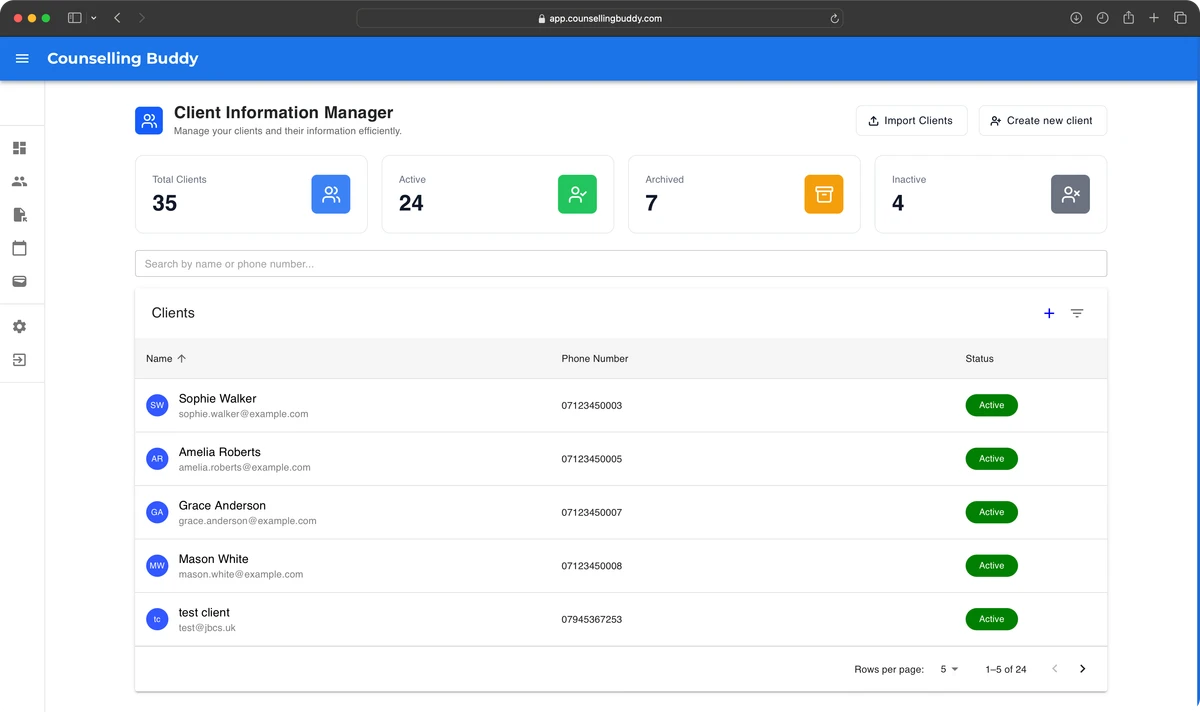
Counselling Buddy gives you one place for everything: a secure, encrypted client database, letting you store contact details, session history, notes, documents, payment records - all of which is accessible at the touch of a button.
Built around your professional obligations
When you finish working with a client, you need to be able to retain their information. That being said, you don’t want your client information manager to get cluttered with former clients. We recommend archiving profiles of clients that you have either finished working with, or who you have paused sessions with. This way, you can still access their information via the archived section.
There is also the option to delete client profiles which, in turn, deletes all of their records from your database, including session history, documents and notes. If you are deleting a client’s profile, you should be sure that you do not need to hold on to their information in line with GDPR, or professional obligations. Typically, therapists in the UK should retain records for 7 years.
- Fully encrypted - from the moment you click save, your client’s information is fully encrypted & secure
- You remain the data controller - Counselling Buddy acts solely as your data processor
- Audit trails on all data access and deletion events
- UK-based hosting - your data doesn’t leave the country
- GDPR-compliant Counselling Buddy’s features are purpose built for UK therapists, designed to make compliance easy
How it fits into the rest of the platform
Client Management is the hub everything else connects to. From a client profile you can:
- Book a session - opens directly into your session scheduling calendar
- Write a session note - attached to the client automatically
- Send a payment link - generated and tracked in place
- Upload a document - consent form, referral letter, worksheet - whatever you need
- View full session history - every past session in one timeline
Getting started
- Import your existing list via CSV, or add clients one by one
- Fill in the details that matter to you - every field is optional
- Start booking sessions - history builds automatically from there