Stop tracking & chasing payments
Keeping track of sessions and payments, and manually connecting the dots is time-consuming. Chasing clients for payments is awkward and, no matter how you approach it, it feels unprofessional.
With Counselling Buddy’s Billing & Payments feature, the payments side of your practice is automated.
Counselling Buddy automates the payment side of your practice. Payments are collected via Stripe - familiar and trusted by your clients. Payment links are generated from the platform, tracked automatically, and followed up by reminder email if they go unpaid. You don’t have to do any of it manually.
How it works in practice
Every session you book has a fee attached - set in your session type configuration. When the time comes to collect payment, depending on your settings, Counselling Buddy will:
- Generate a payment link and automatically email it to the client 48hrs before their session. You can also manually generate and send payment links if you would prefer, and disable auto billing.
- Your client pays through a secure checkout page - card details never touch your system
- The session updates the transcation is recorded in your billing dashboard and against the session details, and client profile (under the billing tab). You will also receive a payment confirmation email on receipt of the payment.
- If it’s not paid, a reminder email goes out on your configured schedule
- View the full picture in the client’s payment history - every session, every amount, every status
If you need to issue a refund - for a cancelled session, a double charge, or anything else - you can issue a full, or partial, refund from the client’s profile, or your billing dashboard.
Can I customise the process?
Yes! The Billing & Payments feature was designed with flexibility in mind, because no two practices are the same. When you first sign up, your billing process is set to what we consider a reasonable default - meaning that you can use Billing & Payments straight away, with no additional setup. However, there is an in-depth settings page allowing you to control every aspect of your billing process.
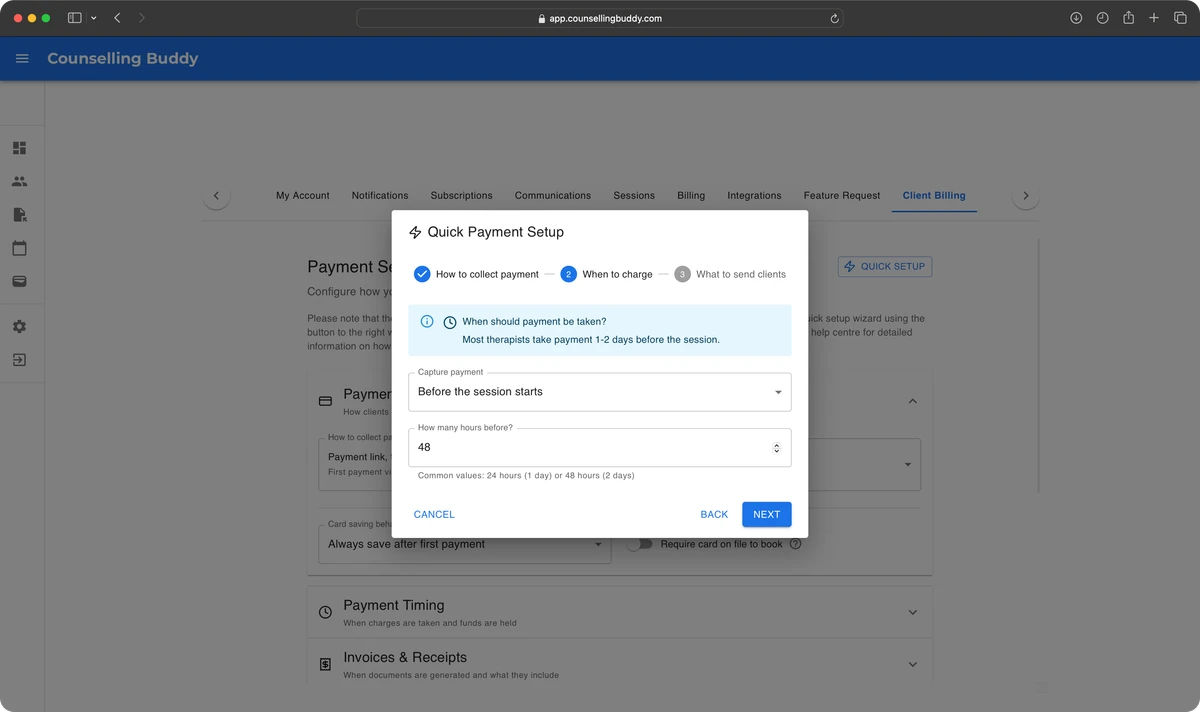
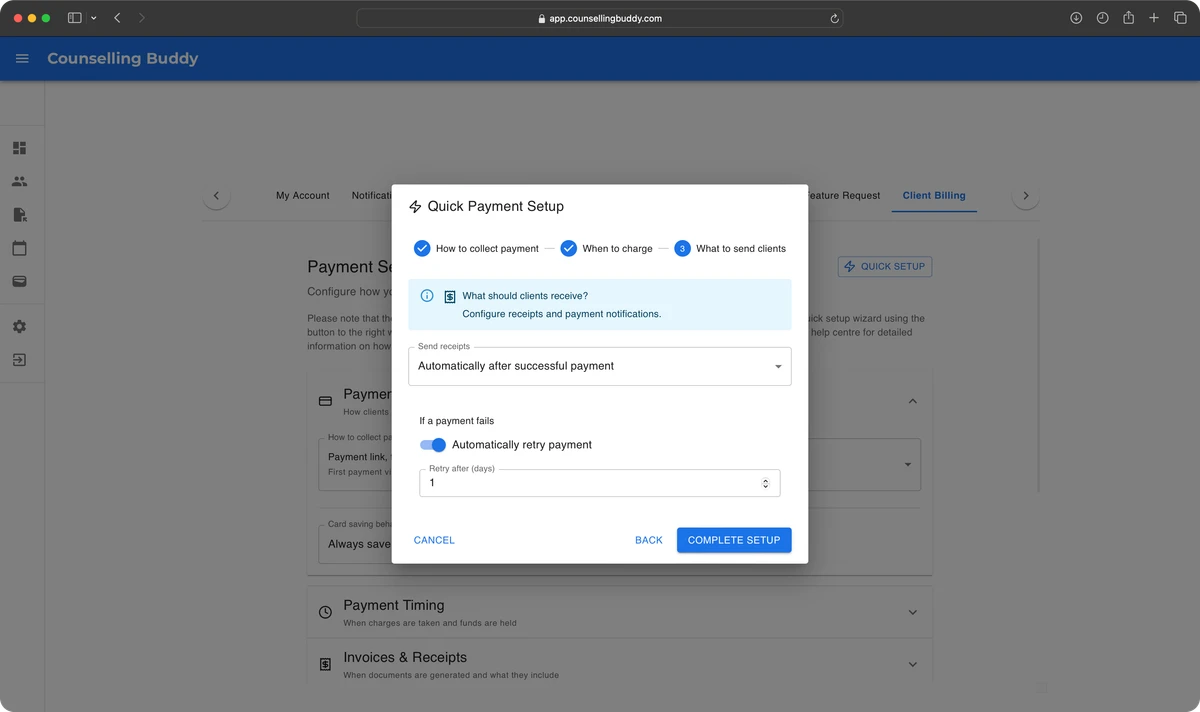
We have also introduced a billing quick-setup wizard, which walks you through the 3 most crucial steps which have the most impact on how Billing & Payments works for you.
- How to collect payments: The first step is selecting how you would like payments to be collected. You can choose
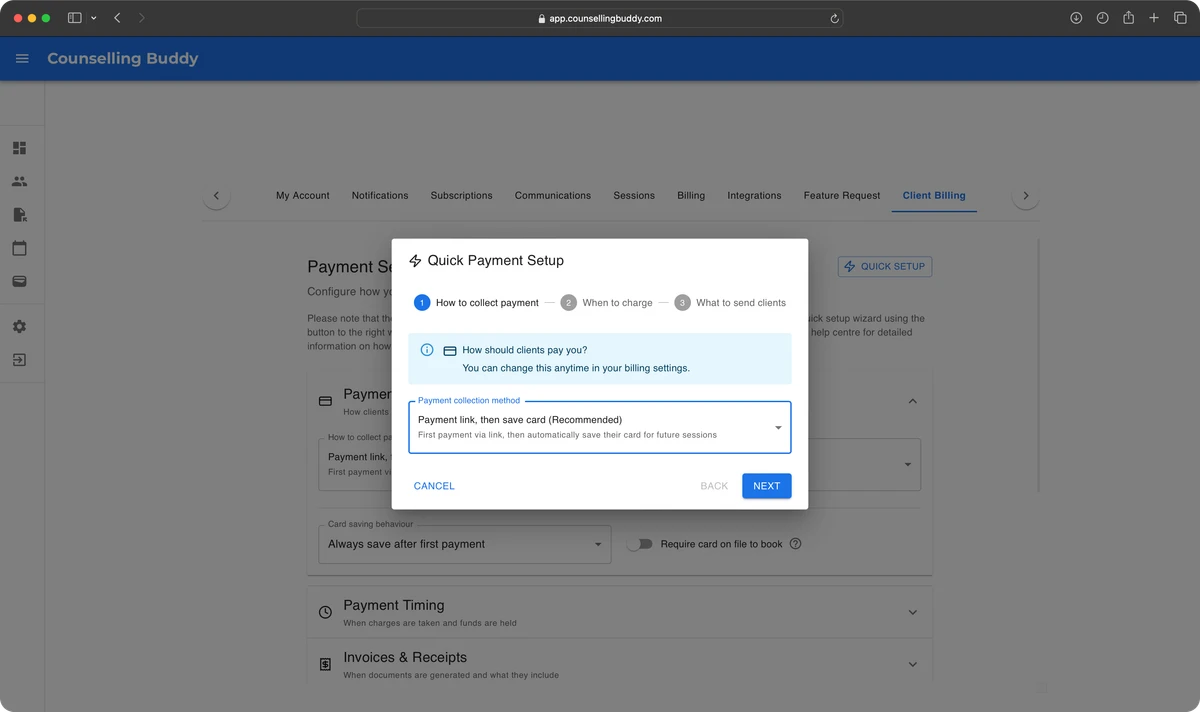
- How to collect payments: The second step is selecting when you want payments to be processed, or when you want payment links to be sent. You can choose from: Before the session starts - allowing you to enter a number of hours before the session (typically 48hrs), Immediately when booked, When session ends or I’ll capture manually, which means that Counselling Buddy won’t process anything automatically for you.
- What to send clients: The last step is deciding whether you want your client to be sent a receipt. The only on request option means that if they pay via payment link, there will be a button they can click to get a receipt. Regardless of the option you choose, both you and your client will be sent an automated payment confirmation email. If the payment is linked to a session, the session details (including date and time) will be included in the email.
Your income, at a glance
The payment history view gives you a running record of every transaction per client - session date, amount, and status. Across your whole practice, the dashboard shows you what’s been collected this week, what’s outstanding, and what’s coming up.
It’s not a full accounting platform - if you need that, it sits alongside your existing setup cleanly. But for tracking session income and chasing late payments, it replaces the spreadsheet entirely.
Security and compliance
Payments are processed via Stripe, our fully PCI-DSS compliant payments processing partner. Your clients’ card details are never processed or stored by Counselling Buddy.
- PCI-compliant payment processing via our payments processing partner, Stripe
- No card data stored in Counselling Buddy
- Encrypted transaction records with full audit trail
- GDPR-compliant data handling throughout
How it fits into the rest of the platform
- Client Management - payment status visible directly on each client profile
- Session Management - session fees configured per session type
- Email Notifications - payment links and reminders sent through your configured templates
- Security & Compliance - financial records are secured by our encryption framework